

For the past couple of months I’ve been sitting at my desk after work trying to read through HTB Academy modules and for the past month I’ve been progressing at a snail’s pace on Footprinting. But it’s really not because I have a hard time understanding it (it’s pretty straightforward actually).
It’s because every single time I start reading through any page that’s long and full of abstract-ish information I need to ingest, I have to re-read it about 3-4 times before I gain any real focus.
It’s kind of like having to do 3-4 practice sets of reading before doing the actual “working set” of reading a paragraph about SNMP OIDs, which is not a hard concept to grasp by the way, but I digress.
The brain doesn’t want to cooperate
Doing passive reading on a very long document is a nightmare for me when referring to studying of any kind, how is it possible for someone to retain so much information by just reading and not actually using it? Don’t get me wrong though, HTB Academy as a platform is very hands-on but there’s still a wall of text I have to get through before actually getting my hands dirty doing the exercises, which I genuinely look forward to.
Getting distracted is very easy when resistance hits, the second reading becomes boring my hands reach for my phone and any excuse I tell myself seems valid to me in that given moment.
And after that, good luck trying to get back to where you were – digging through DNS records is a hard thing to do after a 10 minute session of unintentional doom-scrolling.

What I actually did about it
AI’s a thing now, and a really big one too but I’m very “early”, I don’t want to delegate all of my tasks to AI since it’ll be in place of depth of knowledge, which, if I do skim on that – why am I doing this in the first place, right?
Well I’ve recently switched to Claude and I thought I should make use of it for other things other than cooking recipes (underrated in that domain honestly), so I’ve decided to give it a prompt so it could be more of a tutor instead of a search engine.
I'm currently learning about footprinting different services, I'll give you a chunk of learning material and I want you to break it down for me while giving me a practical exercise for each chunk.That means that after every paragraph of text I have to read, I get to immediately do the exercise that Claude gives me, which more often than not was actually configuring that service on a local VM.
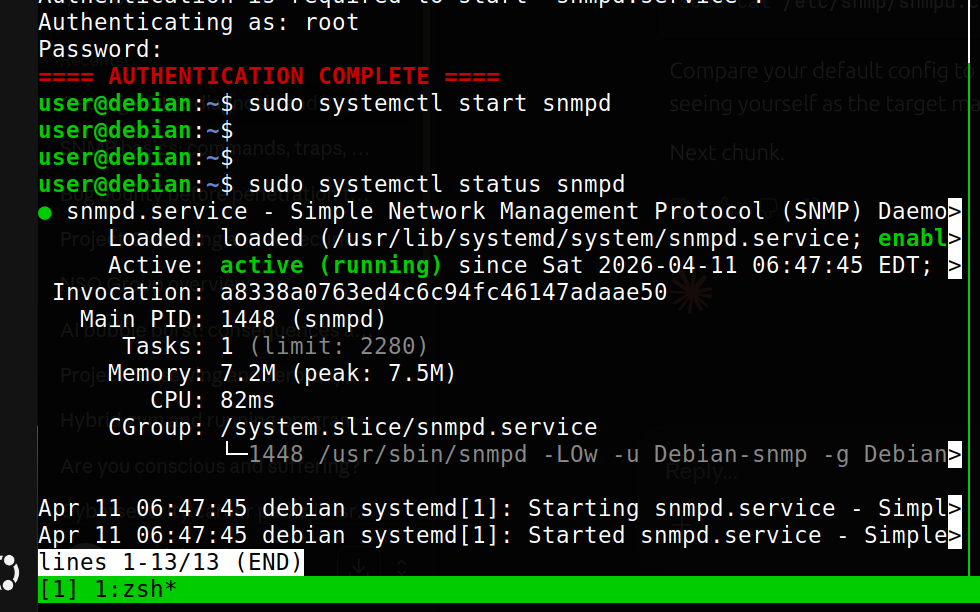
This is actually great for me, because my brain understands that if I focus on this block of text and fully comprehend it I get the reward of actually tinkering with that service immediately, which helps me actually retain the information and get a lot more hands-on rather than drooling and staring at some huge block of text.
I also understand that Claude (or any AI for that matter) might not be very accurate, so I do make the effort to read from HTB Academy’s website and compare, and this might be a little slower, but It’s a lot better than not actually understanding what the service does and how it works.
How I structure my notes
This one’s important, because for a while now my notes were mostly this janky copy-paste of the material i’d write in my own words, which can only get you so far when you need to access information quickly during a CTF (or god forbid, an engagement), I needed a very quick and easy way to structure my notes, so here’s my template:
Key idea - what is this actually doing?
Commands - what did I run?
Dangerous settings - what misconfiguration would make this exploitable?
But for educational purposes I’ll show my notes for SMTP:
Key idea – what is this actually doing?
SMTP (Simple Mail Transfer Protocol) handles outgoing mail – it’s the protocol responsible for sending email between servers. IMAP and POP3 handle the receiving side.
SMTP servers accept requests on port 25, however, newer SMTP servers use other ports such as 587 or port 465.
SMTP has no built-in authentication mechanism by default, we can add TLS using the STARTTLS command or use ESMTP.
Commands – what did I run?
nmap -p 25,465,587 --script smtp-commands <target>
nmap -p 25 --script smtp-open-relay <target>
smtp-user-enum -M VRFY -U /usr/share/wordlists/seclists/Usernames/top-usernames-shortlist.txt -t <target>
telnet <target> 25
Dangerous settings – what misconfiguration would make this exploitable?
smtpd_recipient_restrictionsnot set = open relay, anyone can send mail through your server- VRFY and EXPN commands enabled = we can enumerate valid usernames on the system
- No auth required on port 25 = anonymous connections accepted
- Banner left as default = reveals server software and version
Progress I’ve been having since
Honestly, I can say that for me personally this method proved to be very effective and I feel that making sure that every single study session comes to some kind of outcome, whether it be setting up a local VM with a vulnerable service and enumerating it, just answering the questions on the HTB website and getting them right or even finishing a module knowing I fully understand it is a superb feeling, especially having struggled with this issue for so long.
And it’s also worth noting that for additional focus I use a pomodoro timer, which helps me block my study sessions to see how much time I invest into studying per week and track my progress.
I do hope that this post actually helps someone, or at least let’s them know that there are other people facing these kinds of issues.
If anyone has any feedback or even more helpful information / methods of studying I’d love to hear them.
Try it for yourselves and give me some feedback, until then I’ll be moving on to the next modules.
Leave a Reply